11 Feb 2017
|
jpa
spring
springboot
springdata
일반적으로 JPA에서 Sort기능을 사용하기 위해서 아래와 같이 메서드명에 OrderBy를 붙여 사용합니다.
public Page<T> findAllByNameOrderByCreatedDateDesc();
이와 같이 만드는 경우 일반적인 목록조회 페이지에서 다수의 정렬기능(ex:이름순,날짜순,날짜역순…)을 필요로 할 경우 위와 같은 메소드를 정렬 방식 개수대로 만들어야 하는 단점이 있습니다.
이 때 사용하기 좋은것이 Sort클래스입니다.
Controller에 아래와 같이 인자값으로 등록만 하면 알아서 정렬정보가 세팅됩니다.
@Controller
public List<T> list(Sort sort)
{
  List<T> tList = jpaRepository.findAll(sort);
  return tList;
}
파라메터 형식은 아래와 같이 넘길 수 있습니다.
[이름으로 정렬]
/path?sort=name,asc
[이름 역순으로 정렬]
/path?sort=name,desc
[이름으로 정렬 + ID로 정렬]
/path?sort=name,id
[이름으로 정렬 + ID 역순으로 정렬]
/path?sort=name,asc&sort=id,desc
파라메터에서 전달받은 정렬조건외에 추가적으로 정렬조건을 추가하고 싶을 경우 아래와 같이 and메소드를 이용하여 추가적으로 정렬조건을 넣을수 있습니다.
@Controller
public List<T> list(Sort sort)
{
  sort = sort.and(new Sort(Sort.Direction.DESC, "count"))
  List<T> tList = jpaRepository.findAll(sort);
  return tList;
}
보통 목록에서 정렬은 paging과 같이 하는 경우가 많은데 아래와 같이 Pageable을 인자값으로 받으면 자동적으로 정렬값이 추가됩니다.
@Controller
public List<T> list(Pageable pageable)
{
  List<T> tList = jpaRepository.findAll(pageable);
  return tList;
}
참고 : Spring Data JPA Tutorial: Sorting
10 Feb 2017
|
jvm
그 동안 미뤄왔던 JVM의 기본 구조에 대해 여기 저기 사이트를 참고하여 최종 구조를 그려보았습니다.
여기서 제일 고민했던 부분은 보통 Heap의 Permanent Area로 불리는 영역이 Method Area와 별개인가? 하는 점이였는데 최종 결론은 같은 영역이다!! 라고 결론을 내렸습니다. (RUNTIME DATA AREAS – JAVA’S MEMORY MODEL)참고
JVM 구조
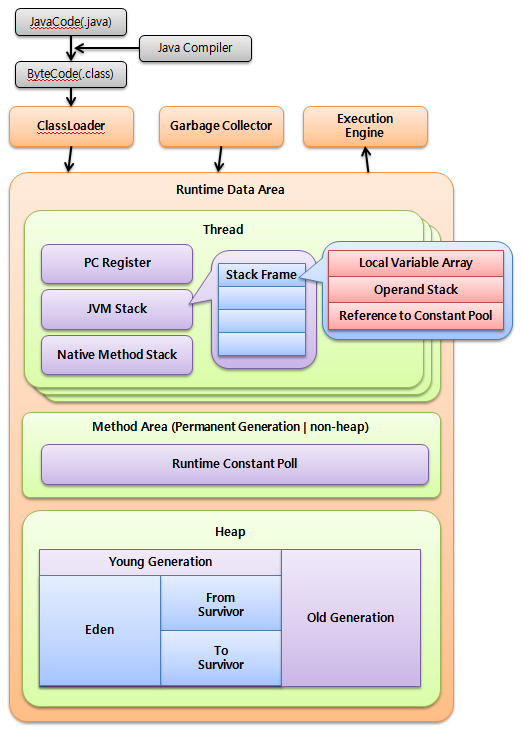
참고
09 Feb 2017
|
springboot
springcache
spel
spring
Spring Cache는 @Cacheable어노테이션만 붙이면 알아서 인자값을 종류에 맞게 캐쉬된 데이터를 사용합니다.
@Cacheable
public List<String> getList(int page, String query){ ... }
위와 같은 경우 두 인자값이 모두 같아야 같은 캐쉬값을 내보내는데 리턴값에 영향을 미치는 요소가 page 인자값만 영향을 미친다면 아래와 같이 캐쉬 키값을 별도로 설정 할 수 있습니다.
@Cacheable(key = "#page")
public List<String> getList(int page, String query){ ... }
#인자값이름으로 특정 인자를 지정할 수 있는데 위와 같이 하면 같은 page값일 경우 query인자값은 어떤 값이 들어오더라도 같은 캐쉬값을 반환합니다.
그런데 아래와 같은 경우 캐쉬가 정상적으로 동작하지 않습니다.
class Person
{
  private String name;

  public String getName(){ return name; }
}

@Cacheable(key = "#kim")
public List<String getList(Person kim){ ... }
이유는 Spring 4.0 이전 버전에서 사용하는 기본 KeyGenerator인 DefaultKeyGenerator가 아래와 같은 방식으로 키를 생성하기 때문입니다.
Spring Cache Abstraction Default Key Generation - 원문보기
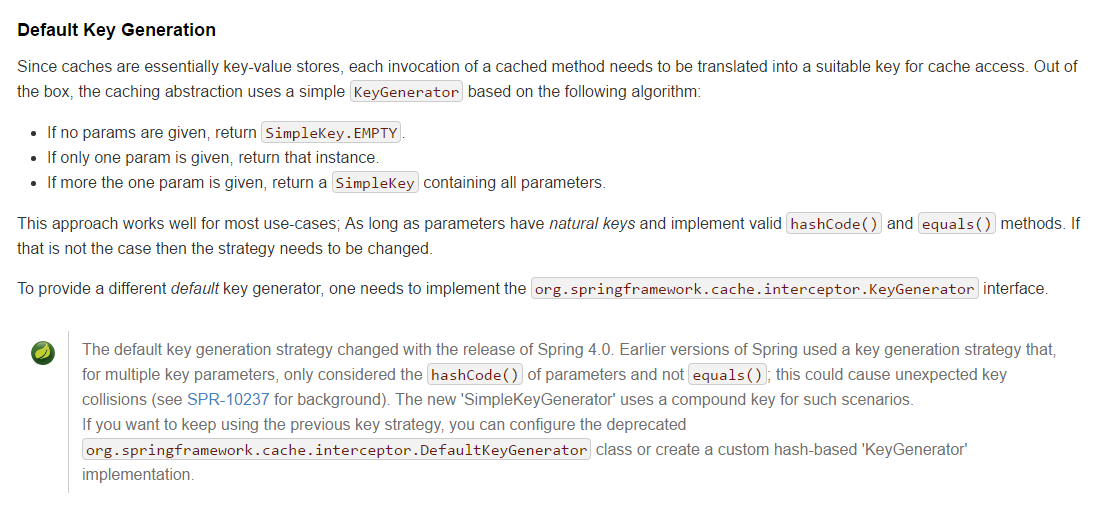
객체의 native값을 이용하거나 Object일 경우 hashCode()만을 사용하여 키 값을 생성하는데 Object의 hachCode는 객체에서 재정의 하지 않은 이상 무조건 다른 값이 들어가게 되기 때문입니다.
Spring 4.0 이후 버전에서의 기본 KeyGenerator는 SimpleKeyGenerator를 사용하며 hashCode만이 아닌 복합키를 사용한다고 합니다.
인자값이 Object 객체인 경우 객체내 값을 이용하여 키 값을 쓸 수 있습니다.(물론 이 때 내부 값도 native값이거나 String같은 heap내 주소가 유일한 경우에만 가능합니다.)
@Cacheable(key = "#kim.name")
public List<String getList(Person kim){ ... }
인자값이 null일 경우를 체크하려면 아래와 같이 사용할 수 있습니다.
@Cacheable(key = "#kim?.name")
public List<String getList(Person kim){ ... }
위 식은 if-then-else 구문에서 else만 빠진것으로 전부 표시하면 아래 같이도 사용 가능합니다.
@Cacheable(key = "#kim?.name:'Unknown'")
public List<String getList(Person kim){ ... }
특정 메소드를 사용하고 싶다면 아래와 같이 사용할 수도 있습니다.
@Cacheable(key = "#kim.getName()")
public List<String getList(Person kim){ ... }
List나 Map값은 객체들은 hachCode값을 이미 내부 객체의 hashCode값들을 이용하여 정해진 규칙대로 만들기 때문에 아래의 경우에는 별도의 처리 없이 사용가능합니다.
하지만 내부에 포함된 데이터가 native타입이 아닐 경우엔 List, Map도 문제가 생깁니다.
@Cacheable(key = "#strList")
public List<String getListByList(List<String> strList){ ... }

@Cacheable(key = "#map")
public List<String getListByMap(Map<Long, String> map){ ... }
마지막으로 인자값이 여러개 있을 경우에 표시하는 예제는 아래와 같습니다.
@Cacheable(key = "'KeyIs' + #kim?.getName():'Unknown' + #page + #list")
public List<String getList(Person kim, int page, List<String> list){ ... }
key값에 사용되는 문법은 sqEL 표현식으로 아래 링크에서 자세한 내용은 확인 가능합니다.
- (Spring Expression Language (SpEL))[https://docs.spring.io/spring/docs/current/spring-framework-reference/html/expressions.html]
08 Feb 2017
|
git
Git을 사용하다보면 branch이름을 바꿔야 할 때가 있습니다.
아래 명령어로 로컬 branch를 간단히 바꿀 수 있습니다.
$ git branch -m [old-name] [new-name]
하지만 remote저장소에 있는 branch이름은 바꿀 수가 없는데 바꾸려면 remote저장소의 branch를 삭제하고 다시 로컬 branch를 이용하여 재생성해야합니다.
remote 저장소 삭제
아래 명령어로 remote 브랜치를 삭제합니다.
$ git push [remote-name] --delete [old-branch-name]
remote저장소에 local branch 올리기
로컬 저장소의 이름을 새 이름으로 변경 후 remote저장소에 새로 올립니다.
$ git branch -m [old-name] [new-name]
$ git push [remote-name] [new-name]
Total 0 (delta 0), reused 0 (delta 0)
To https://github.com/jistol/jistol.github.io.git
* [new branch]      new-name -> new-name
07 Feb 2017
|
springboot
jpa
springdata
spring
spring.jpa.hibernate.ddl-auto
| 옵션 |
설명 |
| create |
기존에 생성되 있던 테이블들을 삭제하고 새로 만듭니다. |
| create-drop |
create와 같은 동작을 하나 종료시에 DROP합니다. |
| update |
변경된 부분만 반영합니다. |
| validate |
테이블과 Entity가 매핑되는지 유효성 검사를 실행합니다. |
| none |
초기화 동작을 사용하지 않습니다. |
import.sql
- 리소스에 위 파일이 위치하면 테이블 생성시 자동으로 스크립트를 실행시켜줍니다.
spring.datasource.data
- 이 옵션에 지정한 파일을 테이블 생성시 자동으로 실행시켜줍니다.
- 파일은 ,(쉼표)로 여러개를 지정하거나 *기호를 이용하여 패턴 지정가능합니다.
- 파일 경로는 클래스패스, 절대경로, 상대경로 모두 지정가능합니다.
예시 : classpath:/sql/test/init-*.sql,file:/home/jistol/sql/test.sql,/META-INF/sql/initScript.sql